Switching between Prometheus servers in Grafana using data source variables

Switching between Prometheus servers in Grafana using data source variables

  • August 3, 2019
Table of Contents

Switching between Prometheus servers in Grafana using data source variables

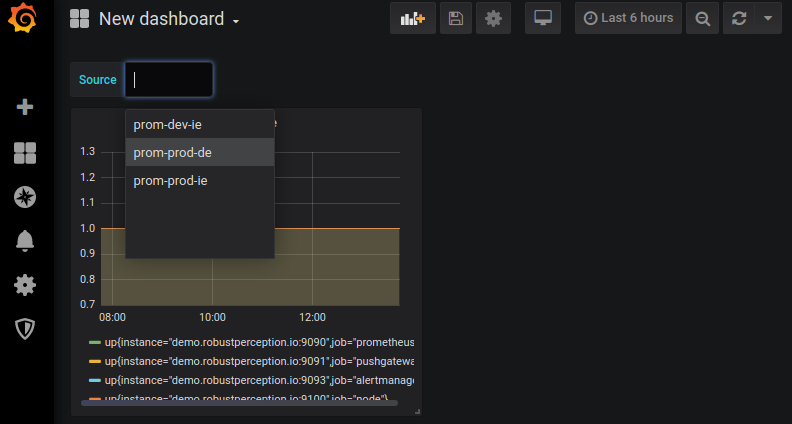
Variables in Grafana (previously known as templates) allow parameterisation of a dashboard via a drop-down menu. Often this is used to switch between machines or services, so that you can have per-machine dashboards without needing to create a dashboard every time a new machine appears. They’re also stored in URL parameters, so could be linked from alert notifications or wiki pages.

Source: robustperception.io

Share :
comments powered by Disqus

Related Posts

Grafana v6.0 Released

Grafana v6.0 Released

Grafana v6.0 brings many new and exciting features and enhancements and at the same time includes a new React platform and architecture for panels & plugins that will fundamentally change Grafana’s future as a platform. Grafana’s dashboard UI is all about building dashboards for visualization. Explore strips away all the dashboard and panel options so that you can focus on the query & metric exploration.

Read More
Monitoring Kubernetes, part 1: the challenges + data sources

Monitoring Kubernetes, part 1: the challenges + data sources

Our industry has long been relying on microservice-based architecture to deliver software faster and safer. The advent and ubiquity of microservices naturally paved the way for container technology, empowering us to rethink how we build and deploy our applications. Docker exploded onto the scene in 2013, and, for companies focusing on modernizing their infrastructure and cloud migration, a tool like Docker is critical to shipping applications quickly, at scale.

Read More