Secure your service mesh with Istio and keep an eye on it with Kiali

Secure your service mesh with Istio and keep an eye on it with Kiali

  • August 4, 2019
Table of Contents

Secure your service mesh with Istio and keep an eye on it with Kiali

It is important to fine-tune the set of services that a workload has access to. It is a good practice to give the least privilege. In that sense, we should grant permissions to each workload to communicate with exactly the services it needs to access.

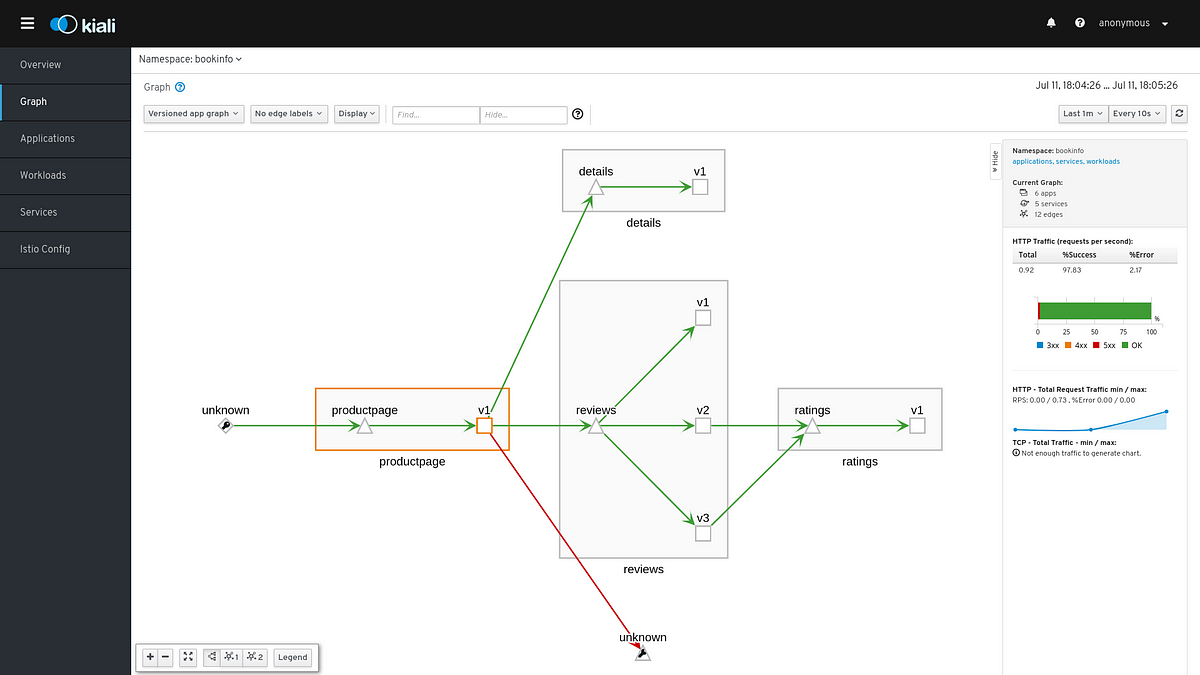
This could also help reducing the attack surface in case of a compromised workload in our mesh. Unwanted requests between servicesFor example, a developer could contact the ratings service directly instead of using the review service. Let’s simulate this by sending requests from productpage to ratings service.export PRODUCTPAGE_POD=$(kubectl get pod -l app=productpage -o jsonpath={.items..

metadata.name})kubectl exec -it $PRODUCTPAGE_POD -c productpage — python -c ‘import requests;r = requests.get(‘http://ratings:9080/ratings/0’); print r;print r.json()’You should get a similar message to let you know that the request succeeded{u’ratings’: {u’Reviewer2′: 4, u’Reviewer1′: 5}, u’id’: 0}After waiting for some seconds, we can refresh the graph and see the request from productpage to ratings.

Source: medium.com

Share :
comments powered by Disqus

Related Posts

Visualizing Istio external traffic with Kiali

Visualizing Istio external traffic with Kiali

Suppose that you have an application using several third party services to store files, send messages, write tweets, etc. It is useful to know how much traffic is going off your mesh to these services, for example, you might want to know how many requests are directed to twitter or how much data is being sent to Dropbox. Also knowing if these requests are successful or if they fail.

Read More
Use Istio traffic mirroring for quicker debugging

Use Istio traffic mirroring for quicker debugging

Often when an error occurs, especially in production, one needs to debug the application to create a fix. Unfortunately the input that created the issue is gone. And the test data on file does not trigger the error (otherwise it would have been fixed before delivery).

Read More
Benchmarking Service Mesh Performance

Benchmarking Service Mesh Performance

Service meshes add a lot of functionality to application deployments, including traffic policies, observability, and secure communication. But adding a service mesh to your environment comes at a cost, whether that’s time (added latency) or resources (CPU cycles). To make an informed decision on whether a service mesh is right for your use case, it’s important to evaluate how your application performs when deployed with a service mesh.

Read More